Business telephony that is practical to run.
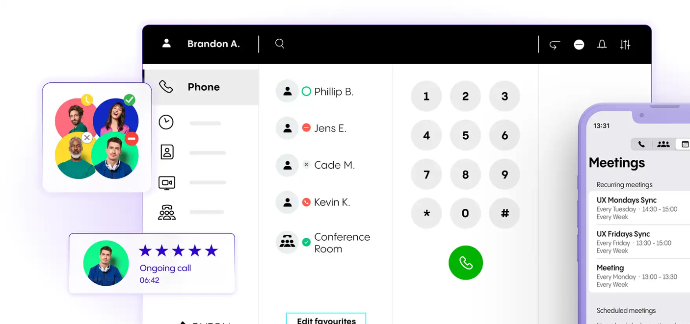
A hosted business telephone system for SMEs and sole traders, supporting professional call handling, flexible working and straightforward administration without an on-premises PBX.
Clear pricing for the licence and calling option you choose.
Phone Extension pricing and airtime bundles are shown separately so you can see what you are paying for.
Choose one plan for the whole phone system
Business Standard or Business Premium applies across the NFON Cloud Telephony tenant, so all Phone Extensions use the same plan. Additional licences and services — such as Mobility Option, Nrecording basic and Record AI — can be assigned to individual extensions where applicable.
*UK Call bundle: Includes calls to UK numbers beginning 01, 02 and 03, plus calls to major UK mobile networks (fair usage policy applies).
Mobility Option
Enables incoming and outgoing calling through the Cloudya apps: the browser-based Web App, the Desktop App for Windows and macOS, and the mobile apps for iOS and Android.
Meet & Share
Video meetings for Business Premium users, with screen sharing, guest access and support for up to 25 participants through supported Cloudya applications.
Nrecording basic
Manual, on-demand call recording on supported certified desk phones. The user starts and stops recording during the call. It records calls made directly via the extension and group calls, but not internal conference calls or calls delivered through a Skill or Queue.
CRM Connect
Microsoft Outlook, Google Contacts and Apple Address Book integration (Apple Address Book on Mac only). Included with Business Premium and not available as a Business Standard add-on.
CRM Connect Plus
Separately licensed CRM integration option available for both Business Standard and Business Premium, from £1.90/month per extension. Supported integrations should be checked for the customer's required system.
Record AI
Call recording, retention, transcription and conversation-analysis capabilities. Record AI starts from £2/month, with retention options ranging from 30 days to 7 years. It can also provide recording for calls delivered through Queues or Skills.
Phone Extension activation
On monthly rolling plans, a £10 one-off activation fee applies when the number of configured Phone Extensions exceeds the highest number previously active on the account. Standard 36-month plans have no activation fee; the Business Premium + hardware fund option has a £10 activation fee per Phone Extension.
Hardware fund
The hardware fund is credit allocated to the qualifying 36-month contract for hardware from the NFON catalogue. Additional qualifying plans added during the term receive a proportional allocation based on the time remaining and are co-terminus with the original contract. Unused hardware fund expires at the end of the contract and cannot be transferred or redeemed for cash.
Indicative UK call charges
For pay-as-you-go calls, or calls not covered by an applicable airtime bundle:
Call type | Connection | Per minute |
|---|---|---|
UK national landlines | 0.16p | 1.15p |
Major UK mobile networks | 0.07p | 4.62p |
Prices exclude VAT. Full current call-rate information, including rates for other UK number ranges and international destinations, is available from FVC Solutions or NFON on request.
UK non-geographic service calls: calls to 084, 087, 09 and 118 numbers consist of NFON's Access Charge of 3.46p per minute plus the Service Charge set by the organisation being called.
Implementation, hardware, additional numbers and optional services may be charged separately. Prices exclude VAT and are subject to the applicable commercial terms.
Designed around real business calling.
Give customers a consistent business number, route calls around the business and let people answer from the device or location that suits the way they work.
Answer where you work
Use a desk phone, cordless handset, Cloudya Web App, Cloudya Desktop App or Cloudya Mobile App, depending on the licence and setup.
Use the mobile network when internet calling is unavailable
The Cloudya Mobile App can place calls using the mobile network when internet calling is unavailable. If a mobile number is registered, NFON can also call that number when a data connection cannot be established. If an active internet call is affected by poor data connectivity, the call can be handed over to the mobile network.
Move an active call between your devices
Call Pull lets a user continue an active call on another device or client assigned to the same Phone Extension, for example moving a call from a desk phone to the Cloudya Mobile App when leaving the office.
Route calls professionally
Ring several people together, place callers in a queue, use announcements and voice menus such as “Press 1 for Sales”, and route calls differently by time of day.
Let users control routine settings
Users can manage supported settings for their own extension, including call forwarding, parallel ringing, Do Not Disturb, voicemail, contacts, call history and Queue or Skill participation.
What the NFON Cloud Telephony platform can do.
These core telephone-system functions are included with NFON Cloud Telephony licences at no additional charge. Exact configuration depends on how your system is set up.
Queues
Hold callers when everyone is busy and route them to agents as capacity becomes available.
Ring Groups
Ring several people together so an incoming call can be answered by an available team member.
Hot desking
Let users work from different supported phones while retaining their own extension identity.
IVR and announcements
Play announcements and give callers menu choices such as “Press 1 for Sales”.
Time Controls
Route calls differently during opening hours, evenings, weekends or other defined periods.
Conference Service
Provide audio conference facilities for up to 50 participants, subject to NFON fair-use conditions.
Skills
Route queued calls according to the skills or responsibilities assigned to available users.
Choose how your telephony system is managed.
Phone-system administration is separate from the routine settings individual users can manage on their own extension.
Use a hybrid approach
Your team handles everyday changes while FVC Solutions assists with agreed advanced configuration or additional administration.
Manage it yourself
Your authorised administrators handle routine phone-system changes directly.
Have FVC Solutions manage it for you
Have FVC Solutions manage your telephony system for you through an appropriate separately scoped management service.
Cloud telephony depends on the network underneath it.
NFON Cloud Telephony requires reliable business-grade Internet connectivity and a suitable local network. NFON provides a browser-based Network Readiness Assessment Tool to check current conditions for Cloudya applications and expected voice quality.
The assessment is a point-in-time check, not a guarantee of future service performance. Where issues are identified, FVC Solutions can separately scope suitable connectivity or local-network work.
Extend NFON Cloud Telephony where there is a business need.
Add integrations, AI, call recording, monitoring and compatible hardware where they support the way your business works.
Microsoft Teams
Use the Cloudya App for Microsoft Teams, or connect Microsoft Teams to NFON Cloud Telephony using Direct Routing.
CRM and CTI integration
Connect telephony with supported CRM and desktop applications using NFON integration options such as CRM Connect, CRM Connect Plus and NCTI Premium.
Devices and accessories
Choose from a broad range of compatible desk phones, cordless devices, headsets and accessories. FVC Solutions can help you select and supply suitable hardware and accessories to meet your operational needs.
AI capabilities
Use AI Essentials for call transcripts, summaries, action items and in-app assistance with Nia. For more advanced call handling, Nia FrontDesk can answer callers, respond to routine enquiries and route calls according to the configured requirement.
Call recording
Use Nrecording basic for manual, on-demand recording on supported certified desk phones, or Record AI for recording, retention, transcription and conversation analysis. Record AI retention options range from 30 days to 7 years and can cover calls delivered through Queues or Skills.
Queue monitoring
Monitor and analyse Cloud Telephony queues using Nmonitoring Queues.
eFax
Provide fax capability (fax to email) where fax remains a business requirement.
From requirement to working telephone system.
Discovery
Users, sites, numbers, devices, call flows and integrations.
Design and configuration
Configure the agreed NFON Cloud Telephony solution.Network readiness
Check whether the Internet connection and local network are suitable.
Migration and number porting
Coordinate number porting and transition where required.
Enablement and handover
Provide agreed user enablement, documentation and administrative handover.
Support and administration
Provide first-line support, escalation and optional ongoing administration within the purchased scope.
Emergency calling
NFON Cloud Telephony depends on mains power, internet connectivity, local network equipment and correctly configured NFON services.
Calls to 999 and 112 should be available from appropriately configured NFON Cloud Telephony services, but emergency-calling behaviour can vary depending on the device and location.
If phones, Cloudya apps or users move between sites or are used remotely, the location information associated with an emergency call may not reflect the caller’s actual location. Callers should therefore clearly state their location and provide a reliable callback number.
Customers should keep site and service-location information up to date and consider how emergency calls will be made during a power, internet or network-equipment failure.
Questions customers commonly ask about cloud telephony.
NFON Cloud Telephony is a hosted business telephone system. The telephone-system platform runs in the cloud rather than on a traditional PBX installed at your premises.
Existing numbers can often be ported, subject to availability, eligibility and the existing provider's porting process. Number porting is handled as part of migration rather than being a platform feature.
You need suitable business-grade Internet connectivity and a local network capable of supporting voice traffic. The NFON Network Readiness Assessment Tool can help assess current conditions.
Yes. NFON Cloud Telephony supports the Cloudya App for Microsoft Teams and Direct Routing via NFON Cloud Telephony. Operator Connect is a separate route associated with SIP Trunk Flexx.
You can administer routine changes yourself, have FVC Solutions manage your telephony system for you through an appropriate service, or use a hybrid approach.
Is NFON Cloud Telephony right for your business?
We can review your users, locations, existing numbers, call handling, network readiness and the level of administration you want to retain.